
Why Was NumPy Created?
Hey, welcome to my website, guys! The moment people hear “NumPy,” they imagine boring syntax, or that scary cube-box thing — and they assume they won’t understand anything because NumPy is supposedly the most basic library for everything.
Here’s a little experiment: go ahead and search “NumPy” on any search engine. You’ll find some websites and blogs. I did the same search, and I found three different definitions. Let’s see how much you actually understand from these:
Definition 1:
NumPy is a Python library designed to work with arrays and perform numerical operations. It also includes tools for linear algebra, matrix calculations, and Fourier transforms. Created by Travis Oliphant in 2005, NumPy is an open-source library whose name stands for Numerical Python.
Definition 2:
NumPy, short for Numerical Python, is a free and open-source library widely used in scientific and engineering applications. It introduces the powerful ndarray (N-dimensional array) data structure and provides a large collection of optimized functions to efficiently manipulate and analyze numerical data.
Definition 3:
NumPy is a Python library built for high-performance numerical computing. It offers efficient multi-dimensional arrays along with a wide range of mathematical functions, making it an essential tool for handling large datasets and performing complex calculations in fields such as Data Science, Machine Learning, and Artificial Intelligence.
Now be honest…
Did those definitions actually explain why NumPy exists?
For me, they answered
What is NumPy? , but not why someone felt the need to create it. And once you understand that “why,” learning NumPy becomes much more exciting. So let’s forget the complicated definitions for a moment and travel back to a time before NumPy existed.
Let’s go back to a time when NumPy didn’t even exist.
Imagine you’re a scientist, engineer, or maybe an AI researcher. You have millions of numbers to work with. These numbers could be students’ marks, weather records, stock prices, or even the pixels of an image.
Now obviously, Python already existed. So why didn’t people just use Python?
Well… they did.
The problem was that Python wasn’t built for handling huge amounts of numerical data. It was amazing for general programming, but when it came to performing millions of mathematical calculations, things became slow.
For example, imagine you have 10 million numbers and you want to add 5 to each one.
Using a normal Python list, Python has to visit every single element one by one.
1 + 5
2 + 5
3 + 5
...
10,000,000 + 5
Imagine doing that for millions of values every time. 😭
Now think about AI.
An AI model doesn’t just deal with ten numbers. It deals with millions—sometimes even billions—of values while training.
If processing just one dataset takes forever, imagine how slow AI would become!
That’s exactly the problem NumPy was created to solve.
Instead of relying on normal Python lists, NumPy introduced something called an ndarray (N-dimensional Array). It’s specially designed for numerical calculations. It stores data more efficiently and performs operations much faster by using highly optimized low-level code behind the scenes.
And here’s the interesting part…
Today, almost every major library used in Data Science, Machine Learning, and Artificial Intelligence either depends on NumPy directly or is built around the same array concepts.
Libraries like Pandas use NumPy for handling data.
Scikit-learn trains machine learning models using NumPy arrays.
Even TensorFlow and PyTorch, which are used to build deep learning models, follow the same idea with tensors.
So when people say,
“Learn NumPy first.”

they aren’t asking you to memorize another Python library.
They’re asking you to learn the language that almost the entire AI ecosystem speaks.
Where is NumPy Used in AI, Machine Learning & Data Science?
Before we jump into the examples, let me tell you one important thing.
It doesn’t build AI models.
Instead, it prepares the data and performs fast mathematical calculations so that AI models can learn efficiently.
Think of it like this: AI is the chef, and NumPy prepares all the ingredients before the cooking even begins. Now, let’s see where NumPy actually appears in an AI project.
🖼️ Step 1: Does AI Really See Images Like We Do?
Imagine you’re building an AI model that can identify cats and dogs. You upload a picture of a cat and ask the model to recognize it. Now here’s a question—do you think the AI actually sees a cute little cat like we do?
No.
To us, it’s a photo. But to a computer, every image is nothing more than millions of numbers. Every pixel has a numerical value, and together those values form a huge NumPy array. Before an AI model can understand an image, it first has to be converted into numbers, and that’s where it comes into the picture.
📸 Step 2: One Image is Fine… But What About 50,000 Images?
Working with one image is easy. But real AI projects don’t train on one or two images—they often use thousands or even millions of them.
Before these images are given to the AI model, they usually need to be resized, cropped, rotated, or normalized. All of these operations happen on NumPy arrays, allowing the computer to process huge datasets much faster than it could with normal Python lists.
📊 Step 3: Data Isn’t Always Clean
Now let’s move from AI to Data Science.
Imagine a company gives you a dataset containing a person’s age, salary, years of experience, and city. Can we directly train a machine learning model on it?
Not really.
First, we need to understand and clean the data. We calculate values like the mean, median, maximum, minimum, and standard deviation to find patterns or detect unusual values. NumPy provides optimized mathematical functions that make these calculations extremely fast, even for very large datasets.
🤖 Step 4: The AI Finally Starts Learning
If you’ve started learning Machine Learning, you’ve probably seen code like this:
model.fit(X, y)
But have you ever stopped and wondered what X and y actually are?
In most cases, they are NumPy arrays. The model doesn’t learn from Python lists—it learns from numerical data stored efficiently inside NumPy arrays. That’s one of the reasons NumPy is considered the backbone of many machine learning libraries.
🧠 Step 5: What About Deep Learning?
When you move on to Deep Learning, you’ll start using libraries like TensorFlow and PyTorch. These libraries work with tensors, which are conceptually very similar to NumPy arrays but designed for more advanced computations, especially on GPUs.
This is why almost every AI roadmap starts with NumPy. Once you understand arrays and numerical operations in NumPy, learning tensors becomes much easier.
🚗 Step 6: Where Do We See This in Real Life?
The interesting part is that this isn’t just theory.
When a self-driving car looks at the road, the camera captures an image that is converted into numerical data before the AI decides whether to brake or turn.
When Netflix recommends your next movie, it analyzes huge amounts of numerical user data before making a suggestion.
Even AI chatbots process text as numbers before generating a response.
No matter the application, NumPy is quietly working behind the scenes to make these calculations fast and efficient.

🎯 So… Where is NumPy Actually Used?
The answer is simple—it is used almost everywhere.
From preparing data and processing images to training machine learning models and supporting deep learning frameworks, NumPy plays an important role throughout the AI pipeline.
That’s why experienced AI engineers don’t recommend learning NumPy just because it’s another Python library. They recommend it because it forms the foundation on which much of the Python AI ecosystem is built.
Did you know?
Every digital image you click on your phone is eventually represented as numbers before an AI model can understand it
How Does NumPy Actually Work?
By now you know why NumPy was created and where it’s used. But here’s the real question — how does it actually manage to be so much faster than a normal Python list?
Let’s understand this with a simple analogy.
🧺 Imagine Two Types of Storage Boxes
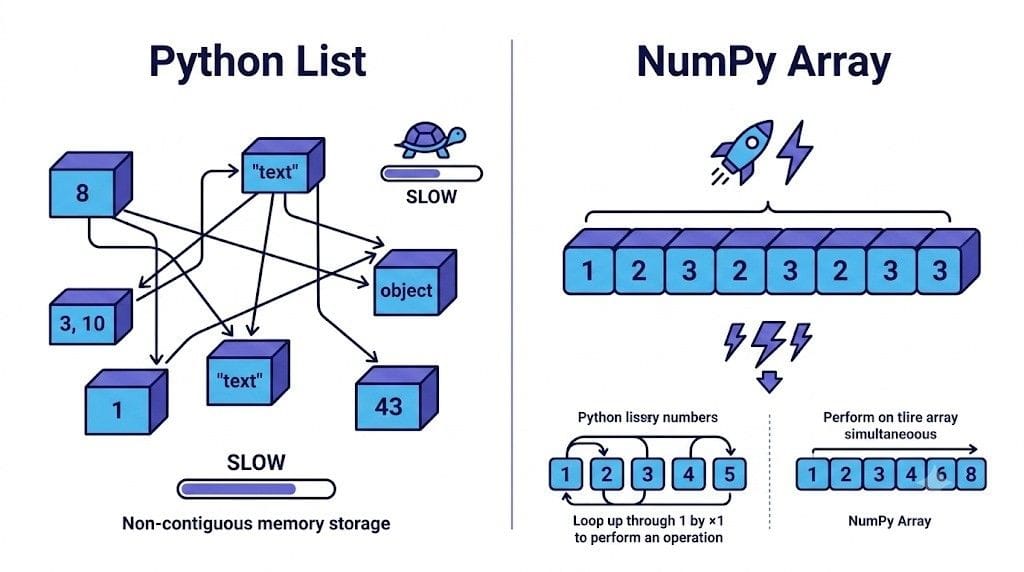
A normal Python list is like a box where you can throw in anything — a number, a text, another box inside it, whatever you want. Sounds flexible, right? But here’s the catch — because Python doesn’t know what’s coming next, it has to check the type of every single item, every single time you do something with it. That checking takes time.
Now imagine a different box — one where you’ve decided beforehand that it will only hold numbers, all of the same type, neatly lined up one after another. No surprises, no extra checking needed. This is basically what a NumPy array is.
This single decision — “everything inside will be the same type, stored together” — is the real secret behind NumPy’s speed.
📦 It’s All About Memory
Here’s something most beginners don’t realize: a Python list doesn’t actually store your numbers next to each other in memory. It stores references (like addresses) pointing to where each number actually lives. So when Python wants to read your list, it has to jump around in memory, following each address one by one. Imagine if you collect things, but you don’t keep them on a shelf with you — they’re scattered across the city in different lockers, and every time you need one, you have to send someone to fetch it.
A NumPy array, on the other hand, stores all its values right next to each other in one continuous block of memory — like keeping everything on a single shelf, in order. No jumping around, no separate lockers. Just a clean, predictable row of data sitting together.
This is called contiguous memory, and it’s one of the biggest reasons NumPy is so fast.
⚙️ The Real Trick: It’s Not Even Running in Python
Here’s the part that surprises most people.
Even though you write NumPy code in Python, the actual heavy lifting doesn’t happen in Python at all. Behind the scenes, NumPy is built on C, a much faster, lower-level language. When you run an operation like adding 5 to a million numbers, Python doesn’t loop through them one by one anymore — it hands the entire job over to optimized C code, which processes all the numbers in one go.
This approach is called vectorization — instead of doing one calculation at a time, NumPy does them all at once, in bulk.
🔄 A Quick Example to See the Difference
If you wanted to add 5 to every number in a regular Python list, you’d typically write a loop:
python
result = []
for num in my_list:
    result.append(num + 5)
Python has to go through this one number at a time.
With NumPy, you simply write:
python
result = my_array + 5That’s it. No loop. NumPy handles all million additions internally, using C, in a fraction of the time.
🧩 One More Superpower: Broadcasting
You might be wondering — how did my_array + 5 even work? You’re adding one single number to an entire array of values.
This is possible because of something called broadcasting. NumPy is smart enough to automatically “stretch” the smaller value (5, in this case) across the entire array, without actually copying it a million times in memory. It’s like giving one instruction — “add 5” — and NumPy quietly applies it everywhere it’s needed.
We’ll see this in action properly in the hands-on section coming up.
Did you know?
NumPy isn’t actually written in pure Python — a large part of its core is written in C, which is precisely why it can process millions of numbers almost instantly.
Performance Comparison: NumPy vs Python Lists
We’ve talked about why NumPy is fast — contiguous memory, C under the hood, vectorization. But talking about speed and actually seeing it are two different things. So let’s prove it with real code.
Python has a handy little tool for this called %timeit. It runs your code multiple times and tells you the average time it takes — perfect for comparing two approaches.
🐍 First, the Python List Way
python
%timeit [j**4 for j in range(1,10)]
# Create numbers from 1 to 9 and raise each number to the power of 4
Here, Python is creating numbers from 1 to 9 one by one, and for each number, it’s calculating the power of 4, one at a time, in a loop. Simple, but every single step is being handled individually by Python itself.
⚡ Now, the NumPy Way
python
%timeit np.arange(1,10)**4
# Create a numpy array from 1 to 9, raise each element to the power 4,
# and measure how long this operation takes to run (using %timeit)
This line is doing almost the same thing — creating numbers and raising them to the power of 4. But this time, there’s no loop. NumPy creates the array and applies the power operation to all elements at once, using its optimized C backend underneath.
🔍 What Actually Happens When You Run Both?
If you run these two cells yourself, you’ll notice something interesting — the NumPy version consistently finishes faster than the Python list version, even for this tiny example with just a handful of numbers.
And here’s the part that really matters: this gap doesn’t stay small. The moment you go from 9 numbers to 9 lakh or 9 crore numbers (which is completely normal in AI and Data Science), the Python list starts crawling, while NumPy keeps cruising. The bigger your data, the bigger NumPy’s advantage becomes.
“A difference of a few microseconds may not seem impressive here. But in AI, where models process millions or even billions of numbers, saving a tiny amount of time on each operation can turn into minutes or hours of computation saved.”
This is exactly why, when an AI model is training on millions of data points, NumPy (or libraries built on top of it) is doing the heavy lifting behind the scenes — not plain Python loops.
Did you know?%timeit doesn’t just run your code once — it runs it multiple times and even removes the outliers, so the time it shows you is a reliable average, not a one-off lucky (or unlucky) run.
Wrapping It Up
So that’s the journey of NumPy — from understanding why it had to be created, to seeing where it quietly powers almost every AI and Data Science project, to finally understanding how it manages to be this fast, with real proof through %timeit.
The honest truth? You don’t need to memorize every function or every technical term right now. What matters is that the next time you write np.array(), or see X and y inside model.fit(X, y), or hear someone say “vectorize this” — you’ll actually know what’s happening behind that line, instead of just copy-pasting code that works.
That kind of understanding is what separates someone who uses a library from someone who actually gets it.
This was just the foundation — the why, where, and how of NumPy. In the next post, we’ll roll up our sleeves and actually go deeper into NumPy itself — more hands-on commands, more practice, more real examples — so you’re not just aware of NumPy, you’re actually comfortable using it. See you there!
If Python concepts still feel a bit shaky, this beginner-friendly Python guide is a great place to strengthen that foundation before diving deeper into NumPy.”
Sources
Pingback: 7 NumPy Basic Operations Every Beginner Should Know - Beyond The Algorithm
Pingback: AI Coding: 7 Powerful Reasons Programmers Won’t Disappear